The Best CMS for Docusaurus in 2026: A Hands-On Comparison
Docusaurus gets a lot right: you own your content, and every change is tracked in Git. The catch is editing it. Writing and maintaining raw Markdown gets tedious fast, even for developers. It also slows down anyone on the team who'd rather not live in a code editor.
A good CMS fixes that without giving up Git. So we looked at six: Dhub, CloudCannon, TinaCMS, Decap CMS, GitCMS, and Spinal. One of them fell out immediately: Spinal wouldn't let us sign up — as far as we can tell it has been closed to new customers since late 2025 (details below). The remaining five we connected to a real Docusaurus repo and ran through the same checklist. Here's how they compare, and which to choose.
Which CMS should you choose?
If you're short on time, this section is the summary — everything after it is the hands-on evidence.
After testing all five against the same repo, the decision is simpler than the feature matrices suggest:
- Dhub — for getting things done quickly. Zero-config setup, and hassle-free editing your non-technical teammates can use on day one. If your team is used to modern tools like Notion, this is the one. It isn't open source, but there's a free tier — and, like Obsidian, your content is just Markdown files you own, in your own repo. Why not: your repos aren't on GitHub, or you need self-hosting.
- CloudCannon — if you want your site hosted by the same vendor that edits it. Why not: no free tier, three seats at $49/month, no real-time collaboration.
- TinaCMS — if you want open source with a visual editor and you're ready to invest time in setup. Why not: the integration is real work, and PR-based reviews cost $41/month.
- Decap CMS — if you want free and self-hosted above all. Why not: writers get a bare Markdown editor, with no tables, admonitions, or tabs.
- GitCMS — if you like one-time pricing and your site is on a framework whose syntax it fully supports. Why not: the editor shows Docusaurus admonitions and tabs as raw text, and nothing can be saved without buying a license first.
- Spinal — not currently an option: its signup has been quietly disabled since late 2025, so there's no way to start. Details below.
Whichever you choose, take one result from our conflict test with you: in Tina and Decap, don't let CMS edits and direct commits share a branch. The last write wins, silently. Routing CMS edits through pull requests avoids that whole class of problem.
What to consider when choosing a CMS for Docusaurus
Most CMSes look fine in a demo. The real differences show up once a team is editing docs every day. We judged each tool on the things that matter at that point: Git workflow, day-to-day editing and MDX support, adding images, collaboration, hosting and cost, and how well it fits Docusaurus.
This isn't a spec-sheet roundup. We deployed TinaCMS to Vercel with a TinaCloud backend and Decap to Netlify with GitHub OAuth. We edited real pages through each admin UI and checked what actually landed in the repo. We also ran a conflict test on both: open a page in the CMS, push a direct commit to the same file from Git, then save from the CMS and see what happens to the concurrent change.
At a glance
Here's how the five stack up across the criteria above. We'll go deeper on each below.
| Dhub | CloudCannon | TinaCMS | Decap CMS | GitCMS | |
|---|---|---|---|---|---|
| Content editing experience | Great | Limited | Limited | Very poor | No Docusaurus components |
| Real-time collaboration | Full support | Not supported | Not supported | Not supported | Not supported |
| Two-way sync | With conflict resolution UI | With conflict resolution UI | Overwrites on conflict | Overwrites on conflict | Auto-pull; warns, no merge UI |
| Image handling | Drag-drop, auto path | Paste works; no resize/center | Upload + insert; no paste | Folder-based | Library; repo, S3, or R2 storage |
| Onboarding & ease of setup | Connect repo and edit | Easy but cluttered | Requires schema setup | Requires schema setup | Quick; needs .gitcms config |
| Self-hosting | Cloud-only | Cloud-only | Open source | Open source | Cloud-only |
| Git providers | GitHub only | GitHub, GitLab, Bitbucket | GitHub (others via custom provider) | GitHub, GitLab, Bitbucket, Gitea, Azure DevOps | GitHub only |
| Hosting included | |||||
| Pricing | $16/mo2 users · free tier (1 user) | $49/mo3 users · no free tier | $24/mo3 users · free tier (2 users) | Freeself-host · Turbo cloud $29/mo (early access) | $49 onceper site · +$9/seat · read-only preview free |
Prices shown are the monthly cost when billed annually — except GitCMS, which sells a one-time per-site license. Verified June–July 2026; check each vendor's site before relying on a specific number.
The best CMSes for Docusaurus
1. Dhub
Dhub is a Git-based CMS with a Notion-like editor, built specifically for documentation sites, Docusaurus first among them. Full disclosure: Dhub is our product. We built it because nothing else gave us a true visual editor for Docusaurus. We'll stick to claims you can verify yourself in a few minutes on the free tier.
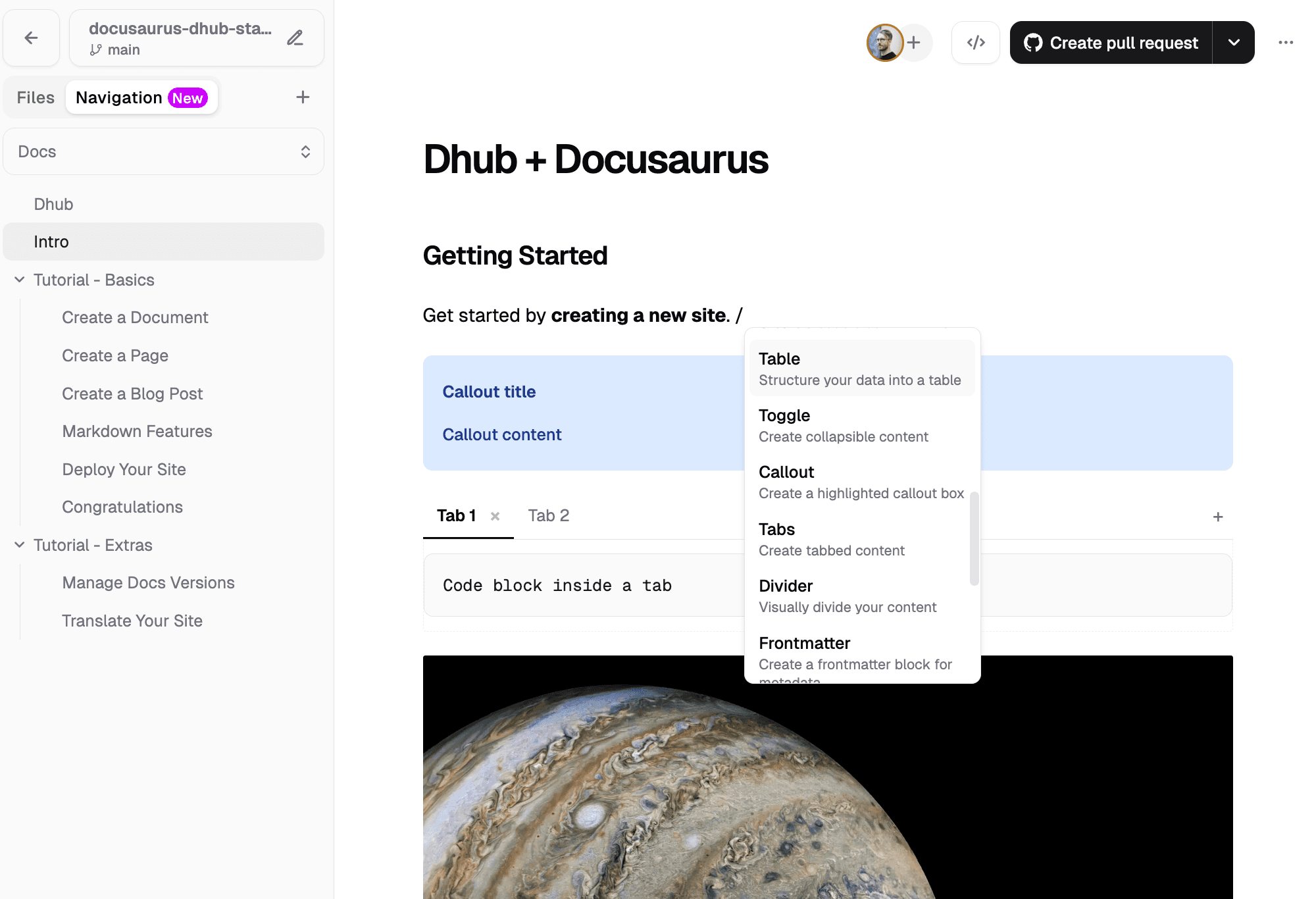
The pitch is simple: connect your GitHub repo and start writing. There's no config file and no schema to write. The whole setup is a two-step import dialog: pick the repo and branch, tick "This is a Docusaurus project", and point Dhub at the project directory if you're in a monorepo. If you're starting from scratch, there are ready-made Docusaurus docs and blog templates.
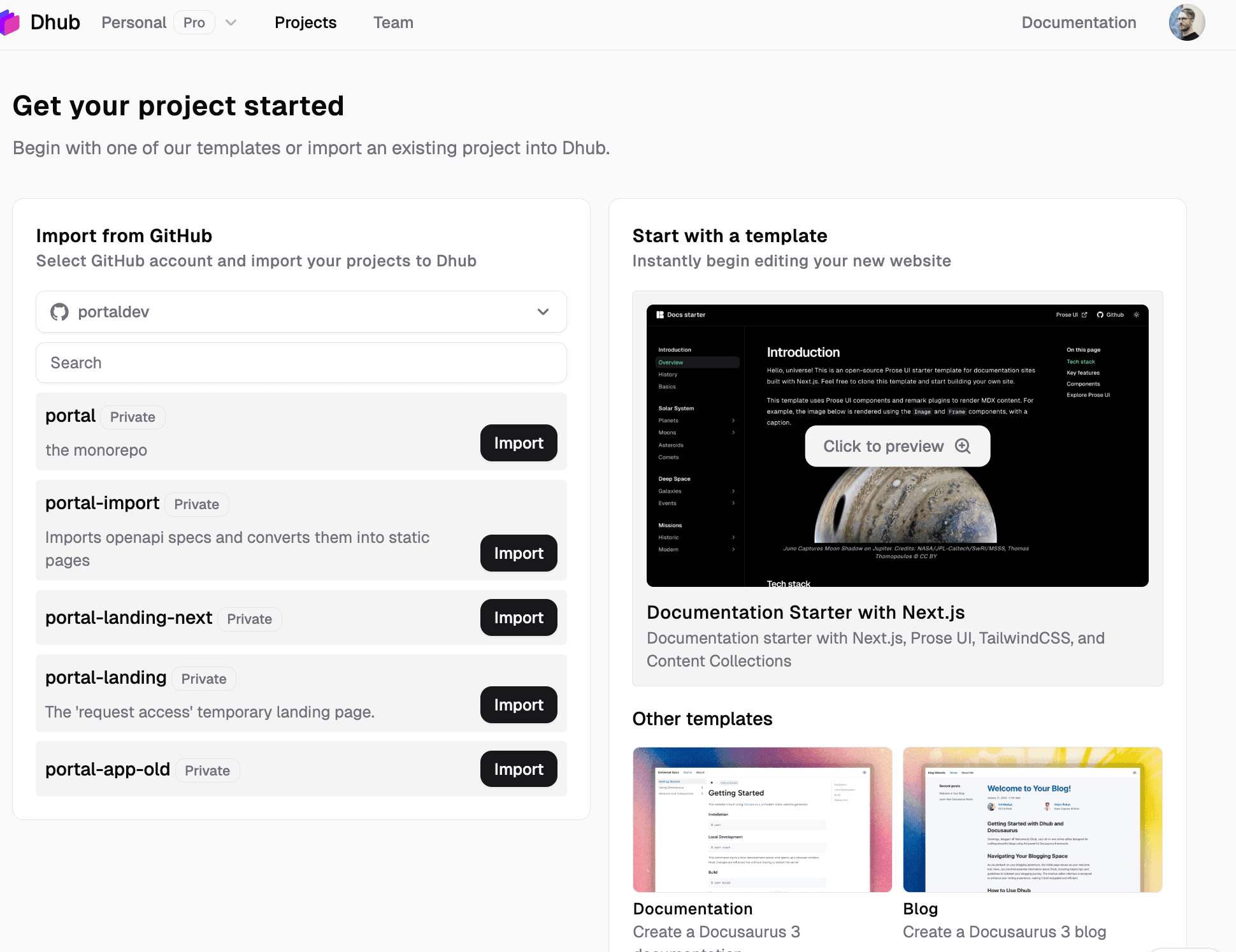
Here's what stands out:
- No configuration for a basic setup. Every other tool in this comparison made us write a config before editing: Tina's JavaScript schema, Decap's YAML, CloudCannon's config file. Dhub reads your existing project structure and shows your files, ready to edit.
- The strongest editor of the five. It's a Notion-style editor with native Docusaurus support. Admonitions, tables, and code blocks insert from a slash menu and edit in place, with no side-panel forms. Images drag and drop straight into the page, and you can resize and caption them inline. Tabs work too. That's the component we couldn't edit visually in Tina, and that's unusable in Decap.
- Real-time collaboration. The only tool in this comparison with live multiplayer editing. Teammates don't need GitHub accounts to contribute, and every push still records who made it as the commit author.
- Changes batch into one commit or PR. Edits accumulate until you push, either straight to your branch or as a pull request that Dhub keeps updating until it's merged. Compare that to Tina, where every save is a separate commit.
- Two-way sync with a conflict screen. "Pull from GitHub" brings in changes made outside Dhub. If the same file changed in both places, you choose which version wins. The silent overwrite that bit both Tina and Decap in our conflict test doesn't happen here.
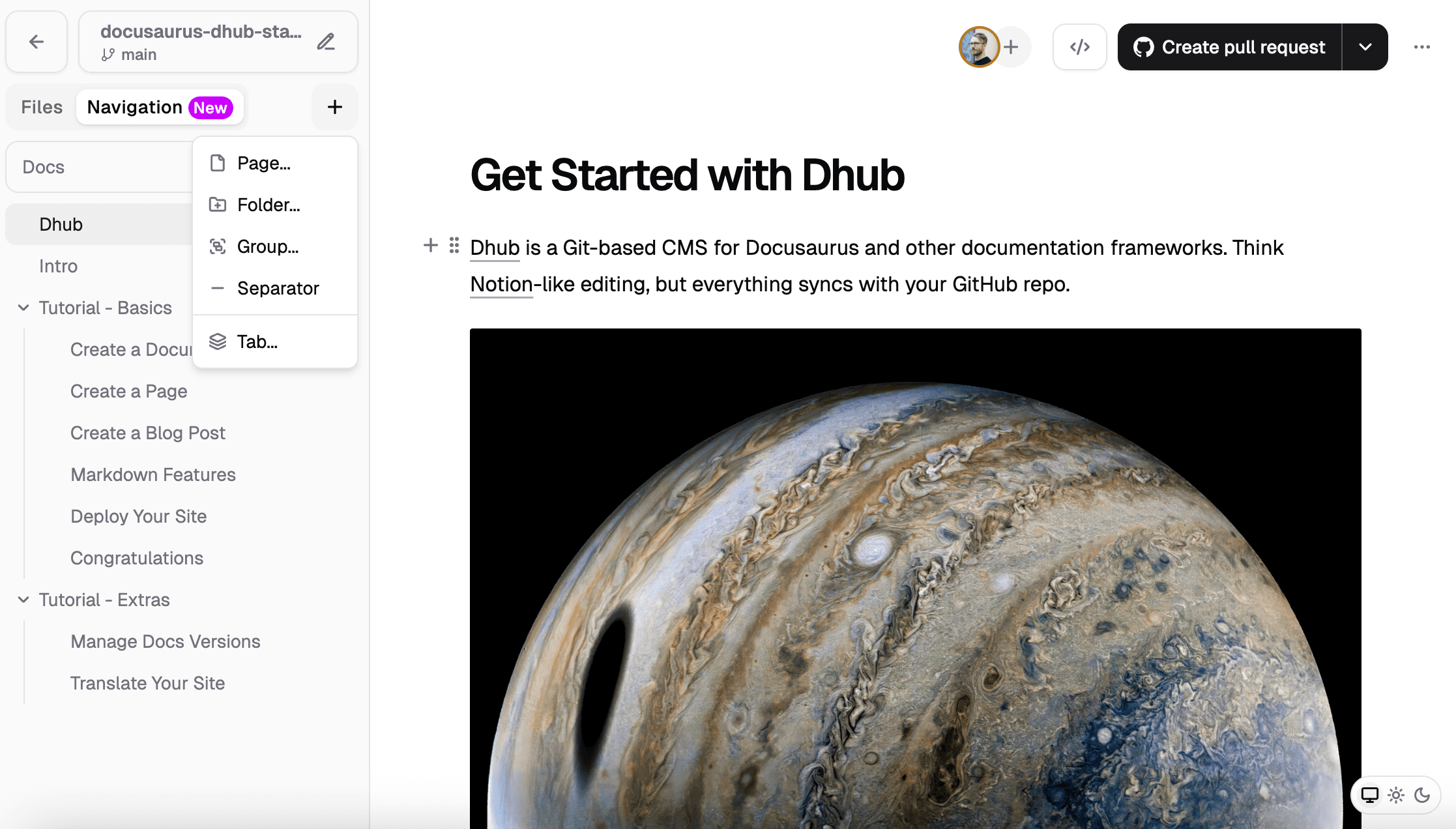
- The only visual navigation editor. CloudCannon left us editing
sidebar_positionfrontmatter by hand, and Tina exposes the sidebar as a raw JSON collection. In Dhub's Navigation tab you add pages, folders, groups, and tabs, drag them to reorder, and the result is saved to anavigation.jsonfile. Wiring that into Docusaurus takes a smallsidebars.jsadapter (docs here). That's the one piece of setup Dhub asks for, and it's optional.
Limitations: Dhub is GitHub-only for now. If your repos live on GitLab or Bitbucket, it's not an option today. It's also cloud-only: you can't self-host it, and it isn't open source. If those are hard requirements, Decap or Tina are your options. It doesn't lock your content in, though. Everything stays plain Markdown and MDX in your repository, so you can stop using Dhub at any time and keep it all. One more gap: heavily custom React components show up as embedded JSX blocks that you edit as code, not visually.
Pricing: There's a free Hobby tier (1 user, public repositories). Starter is $16/month billed annually ($20 monthly) with 2 seats, private repos, and real-time collaboration. Team is $50/month billed annually and starts at 10 seats. Paid plans come with a 14-day free trial. See Dhub pricing →
2. CloudCannon
CloudCannon is a Git-powered CMS and hosting platform for static sites, and it markets a dedicated Docusaurus offering. It's the most "enterprise" option on this list, and the only one that hosts your site as well as editing it.
On paper it ticks a lot of boxes: visual editing, broad Git support, a real conflict-resolution flow. Connecting a repo is reasonably quick. But the dashboard is cluttered, and some of the editing you'd expect out of the box only works after extra configuration.
After creating a project you don't land in an editor. You land on a dense collections screen stacked with "Edit" buttons (Edit Name and Icon, Edit documentation link, Edit description, Edit Preview, Edit Collections, Edit Advanced), while the content cards just read "No preview available."
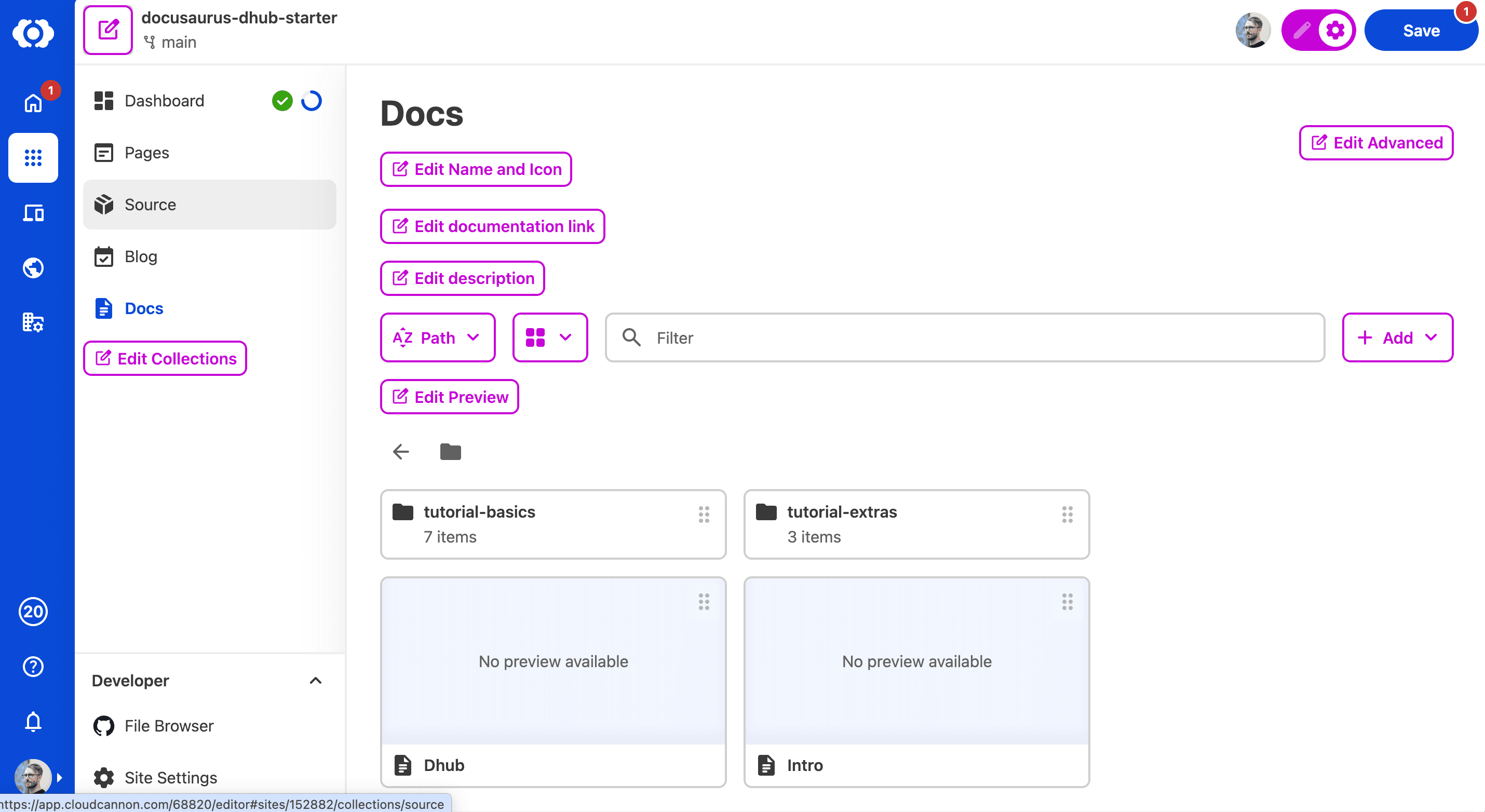
Here are the things that stood out, good and bad:
- Hosts and deploys your site. Editing, builds, and hosting live in one platform. If you want a single all-in-one vendor, this is a genuine advantage no other tool here offers.
- Broad Git support. It connects to GitHub, GitLab, and Bitbucket, the widest provider support in this comparison.
- Two-way sync that works. Changes made directly in the repo flow back in, and there's a conflict UI that lets you discard one version when edits collide.
- Import needs a config file. You can connect an existing Docusaurus repo, but only after adding CloudCannon's own config file. That's an extra step, and a file in your repo you didn't ask for.
- Tables and components need extra config. Out of the box there's no table button. You have to enable it, plus GFM table output, in
cloudcannon.config.yml. Once that's done, tables edit visually. Richer components like admonitions and tabs still open in a separate form instead of editing in place. - Navigation is frontmatter-only. We couldn't find a visual sidebar editor. Reordering pages means editing
sidebar_positionby hand.
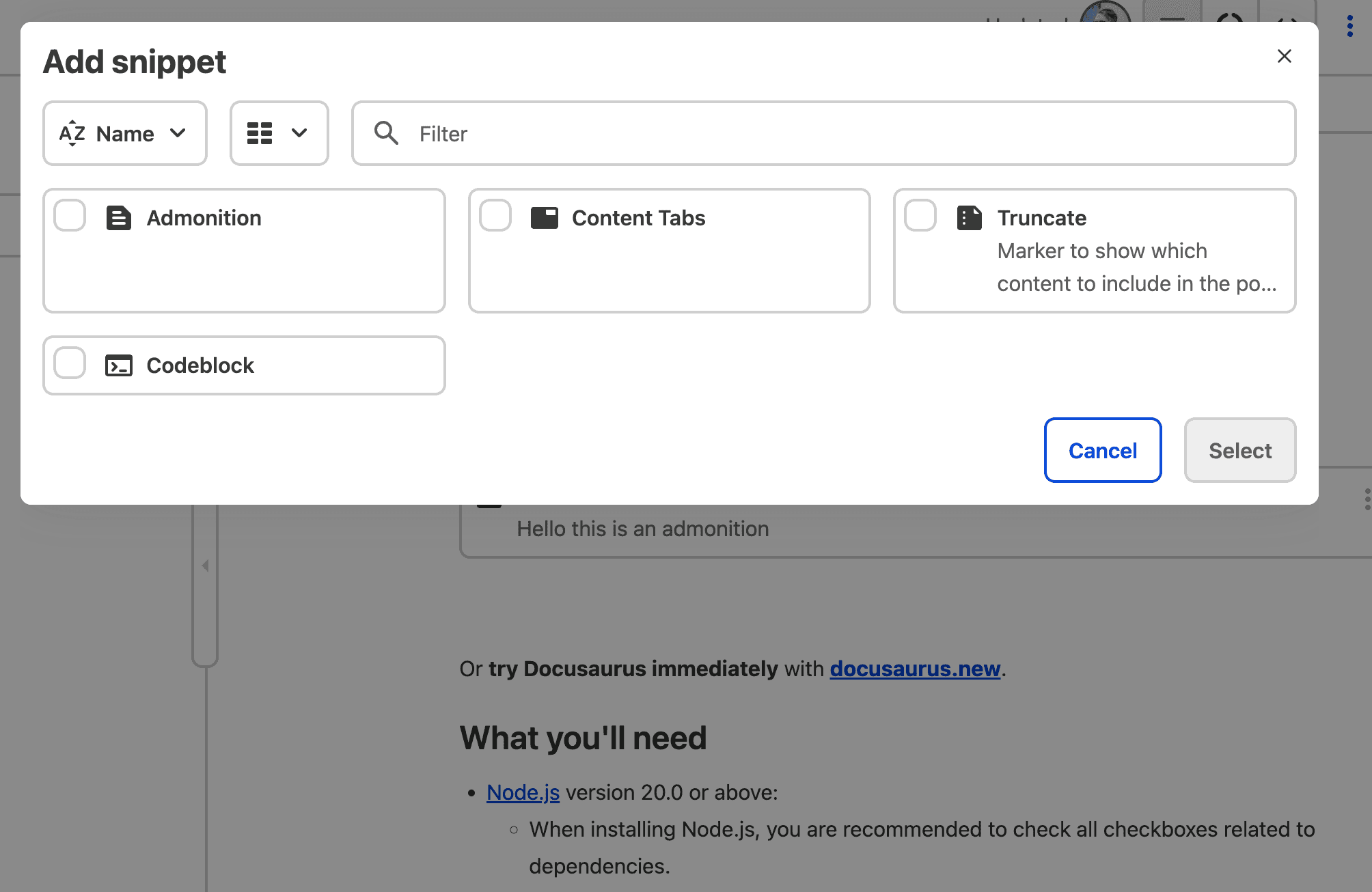
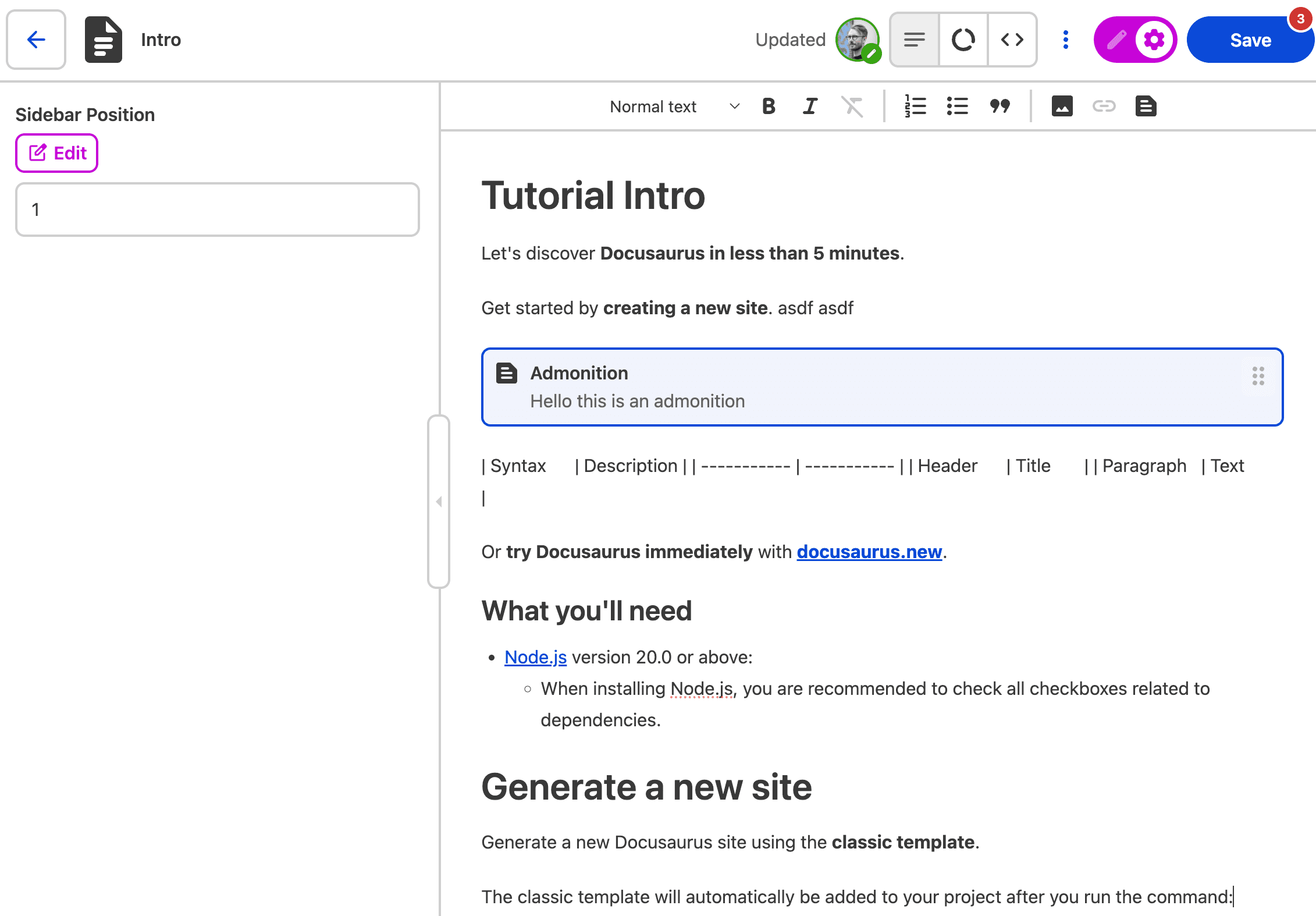
Limitations: The real gap for a docs team is real-time collaboration: there isn't any. Two people editing the same page won't see each other's changes, so whoever saves last wins. Pull requests, on the other hand, are supported, and CloudCannon's review flow is the most refined of the tools here. The catch is the cost. There's no free tier, so that polish costs you from day one (more below).
Pricing: The cheapest paid plan is Standard at $49/month, billed annually, and it caps you at three users. There's no permanent free tier, only a 21-day trial. For a growing docs team, that three-seat ceiling comes fast. See CloudCannon pricing →
3. TinaCMS
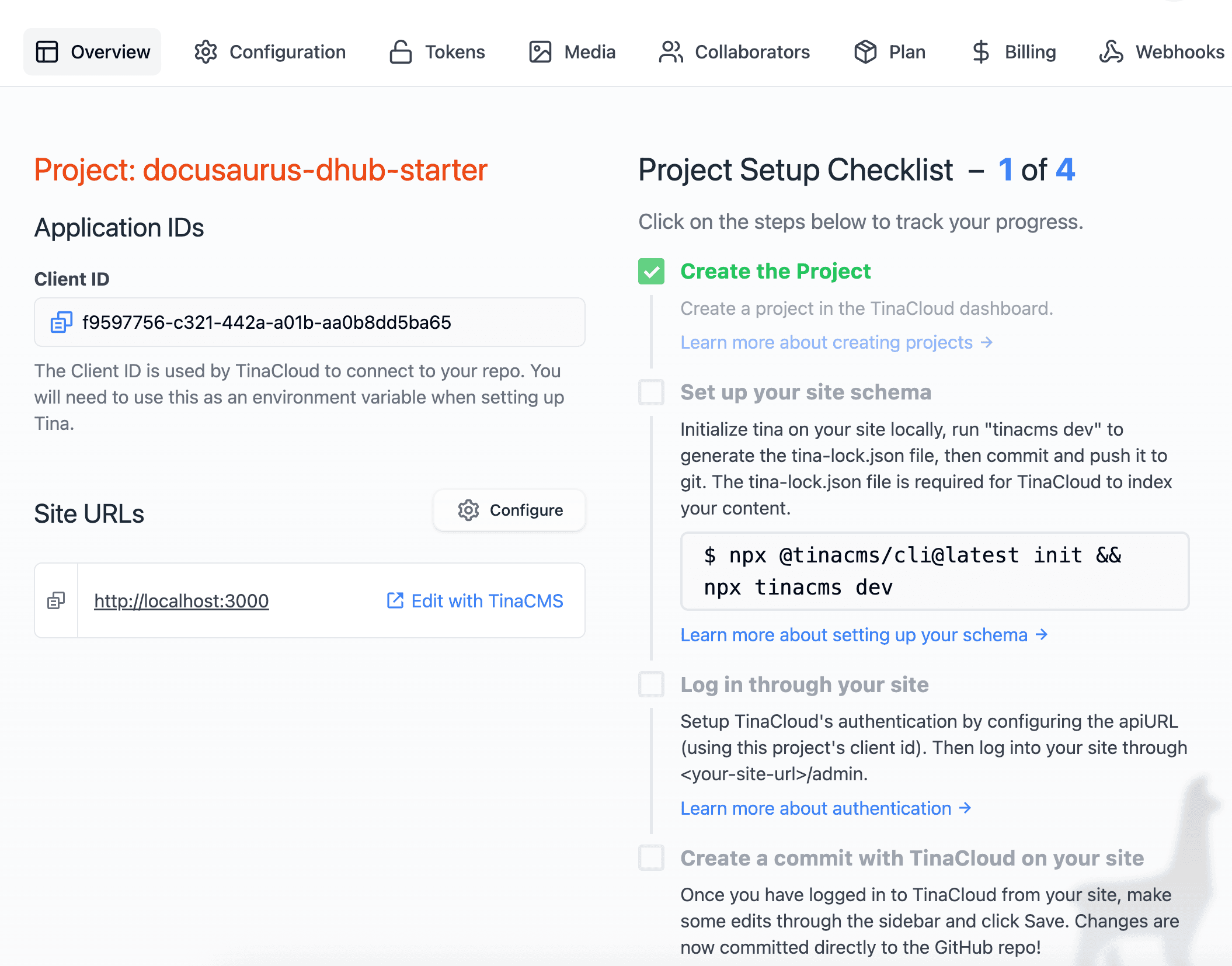
TinaCMS is an open-source, Git-backed CMS with a visual editor. It's the successor to Forestry, built by the same team. Its first-class framework is Next.js, not Docusaurus, but there's an official integration guide and an official starter repo ("Tinasaurus"). We tested both modes: fully local with no account, and a real TinaCloud deployment on Vercel.
The fastest way to try TinaCMS on Docusaurus is that starter. This walkthrough covers the setup end to end:
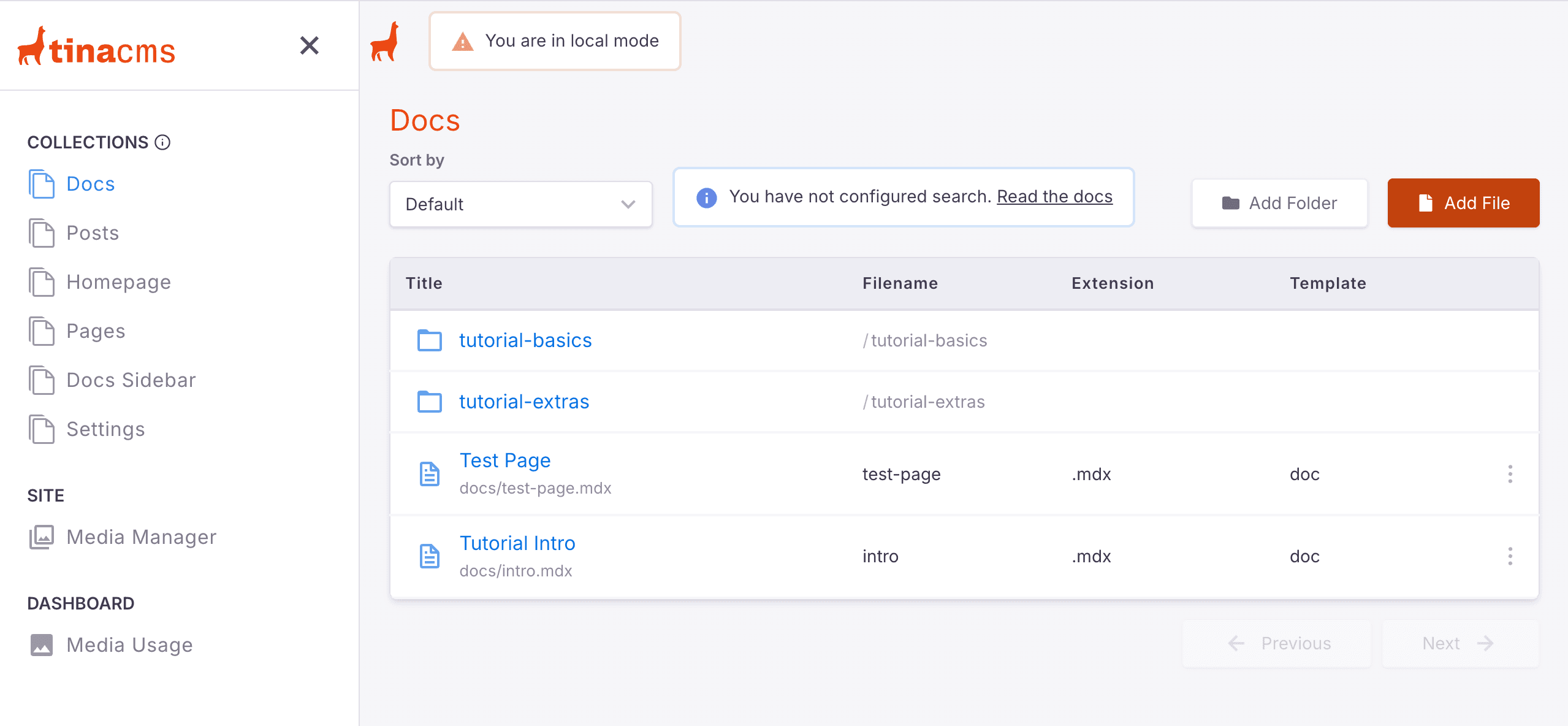
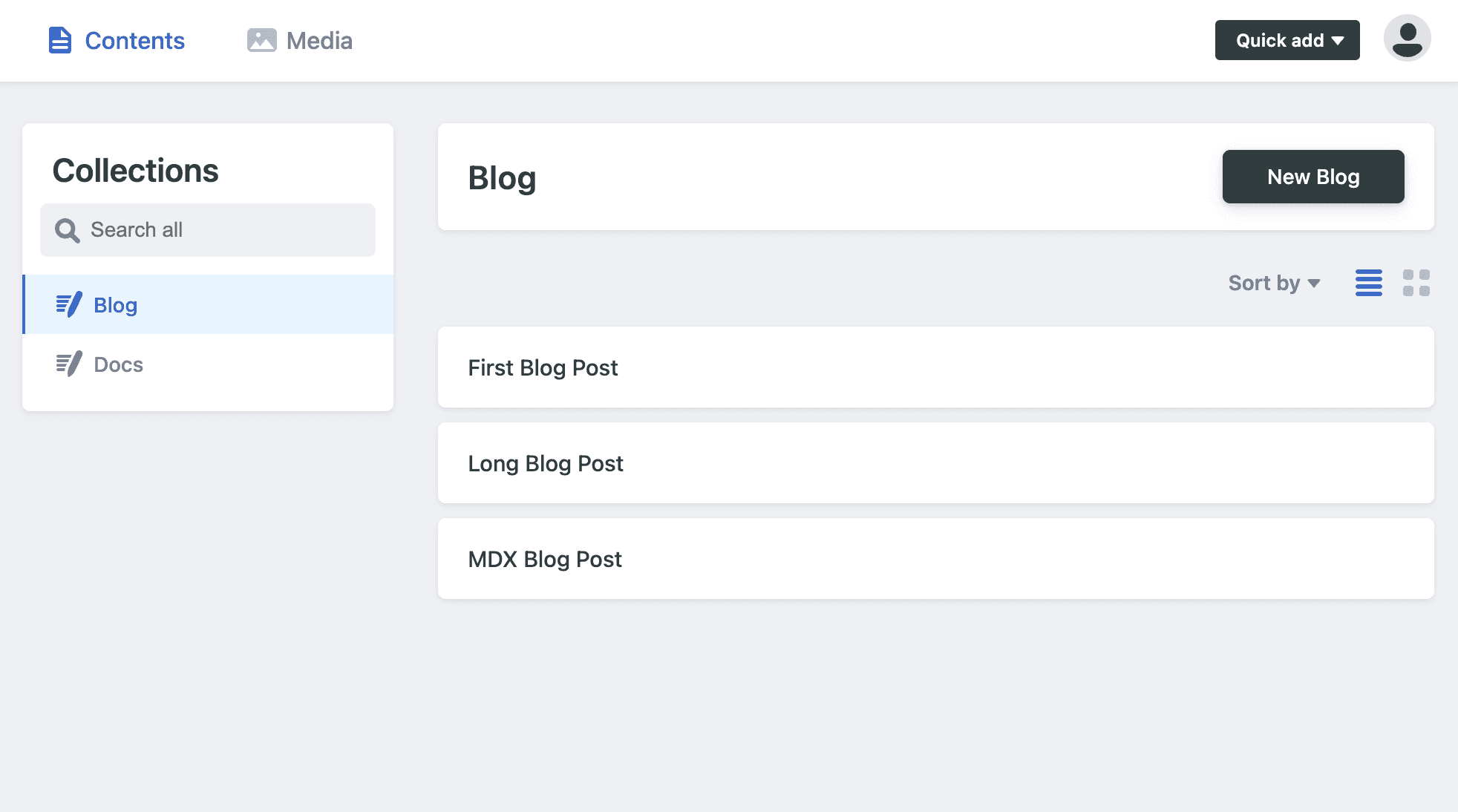
Once running, the admin lands you on a clean collections screen: Docs, Posts, Pages, plus the homepage and sidebar as editable JSON collections.
Here's what stood out, good and bad:
- MDX-native editing is the standout feature. From the rich-text editor we inserted a Markdown table, a fenced code block, and a Docusaurus
<Admonition>component. All of it persisted correctly to the.mdxfiles. No other open-source tool in this comparison can do that. It's the single biggest reason to pick Tina over Decap for Docusaurus. - Components edit through forms, not in place. Admonitions insert and render visually, but editing one means filling out fields in a panel, the same separate-UI pattern as CloudCannon. We couldn't figure out how to edit tabs visually at all. The escape hatch is a raw Markdown view where you write the JSX by hand.
- The official starter is two years behind. Tinasaurus pins Docusaurus 3.3.2, released May 2024, while 3.10 is current. A fresh
npm installreports 69 vulnerabilities. Integrating an existing repo instead is real work: convert.mdfiles to.mdx, register your MDX components globally, rewire three Docusaurus config files, and write a Tina schema. - Every save is its own commit. There's no way to batch several edits into one commit or review a set of changes before they land, so the git history fills up fast.
- The "local" build script needs a cloud account. The starter ships a
build-localscript that fails without TinaCloud credentials, because it uses the wrong CLI flag (--content=localinstead of--local). There's also no free, no-account path to editing on a live site. Production editing requires TinaCloud or self-hosting Tina's backend.
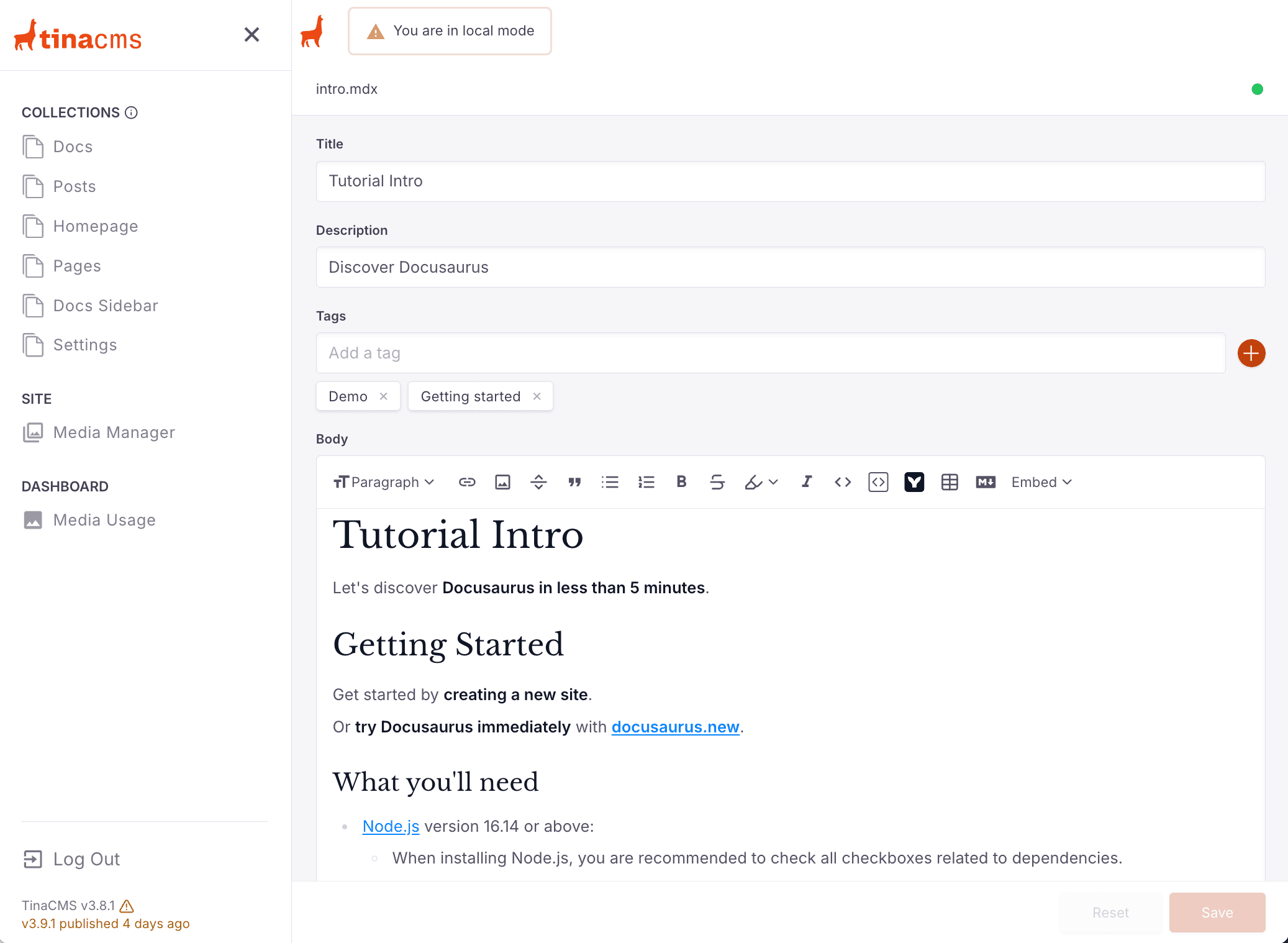
One thing to expect from every CMS in this comparison: visual editors reserialize Markdown when they save. The first edit to an existing page often produces a larger git diff than the change itself, with reformatted bullets, reflowed frontmatter, and normalized links. Give a heads-up to whoever reviews that first PR.
Limitations: There's no real-time collaboration, and our conflict test showed the sharp edge of that. We opened a page in Tina's editor, pushed a direct commit to the same file, then hit Save in Tina. Tina wrote its stale snapshot over the whole document. No warning, no merge. The direct commit's changes were silently gone from the file, recoverable only from git history. Image handling is also middling: you upload to the media library, then insert. There's no pasting from the clipboard, and no resizing or alignment.
Pricing: Self-hosting the open-source core is free, and TinaCloud has a free tier for up to 2 users. The cheapest paid plan is Team at $24/month billed annually with 3 users. The editorial workflow, which routes edits through a branch and PR instead of committing straight to main, requires Team Plus at $41/month. See TinaCMS pricing →
4. Decap CMS
Decap CMS (formerly Netlify CMS) has the most minimal architecture of the four: a single-page app served from your site's /admin path that commits to GitHub straight from the browser via an OAuth handshake. There's no backend service, no database, and no vendor dashboard. The core is free and open source.
That architecture makes it very light to set up. It's also the weakest tool here to write in.
- The leanest setup of the tools that need a config file. The entire integration is two small files:
static/admin/index.htmland a YAMLconfig.ymllisting your collections. Compare that to Tina's JavaScript schema or CloudCannon's config file plus dashboard setup. (Dhub skips config entirely, as covered above.) - You start on the latest Docusaurus. Decap layers onto a site you scaffold yourself, so you get current versions by default. Tina can work with a fresh Docusaurus too, but only through its much heavier manual integration. Its easy path is the outdated starter.
- The official Docusaurus guide is stale. Following it on a current Docusaurus site gives you a working login and empty collections. The guide's config matches
.mdfiles, butcreate-docusaurusnow generates everything as.mdx. Fixing that surfaces a second error, a requiredformatsetting the guide never mentions. And subfolders liketutorial-basics/still won't appear, because folder collections aren't recursive. None of it is hard once you know. But debugging is slow: the admin loads its config from the deployed site, so every fix means a redeploy. - A genuinely good local mode. Set
local_backend: true, runnpx decap-server, and you edit through the real admin UI with no OAuth, writing straight to local files. - Netlify is the paved path. Decap needs a server-side OAuth proxy to talk to GitHub. Netlify provides one for free. Hosting anywhere else means running your own, which is why we started on Vercel and switched to Netlify.
- The cheapest review workflow anywhere. One config line (
publish_mode: editorial_workflow) gives writers a draft → review → ready flow that opens a real GitHub PR per entry. Tina charges $41/month for this. With Decap it's free.
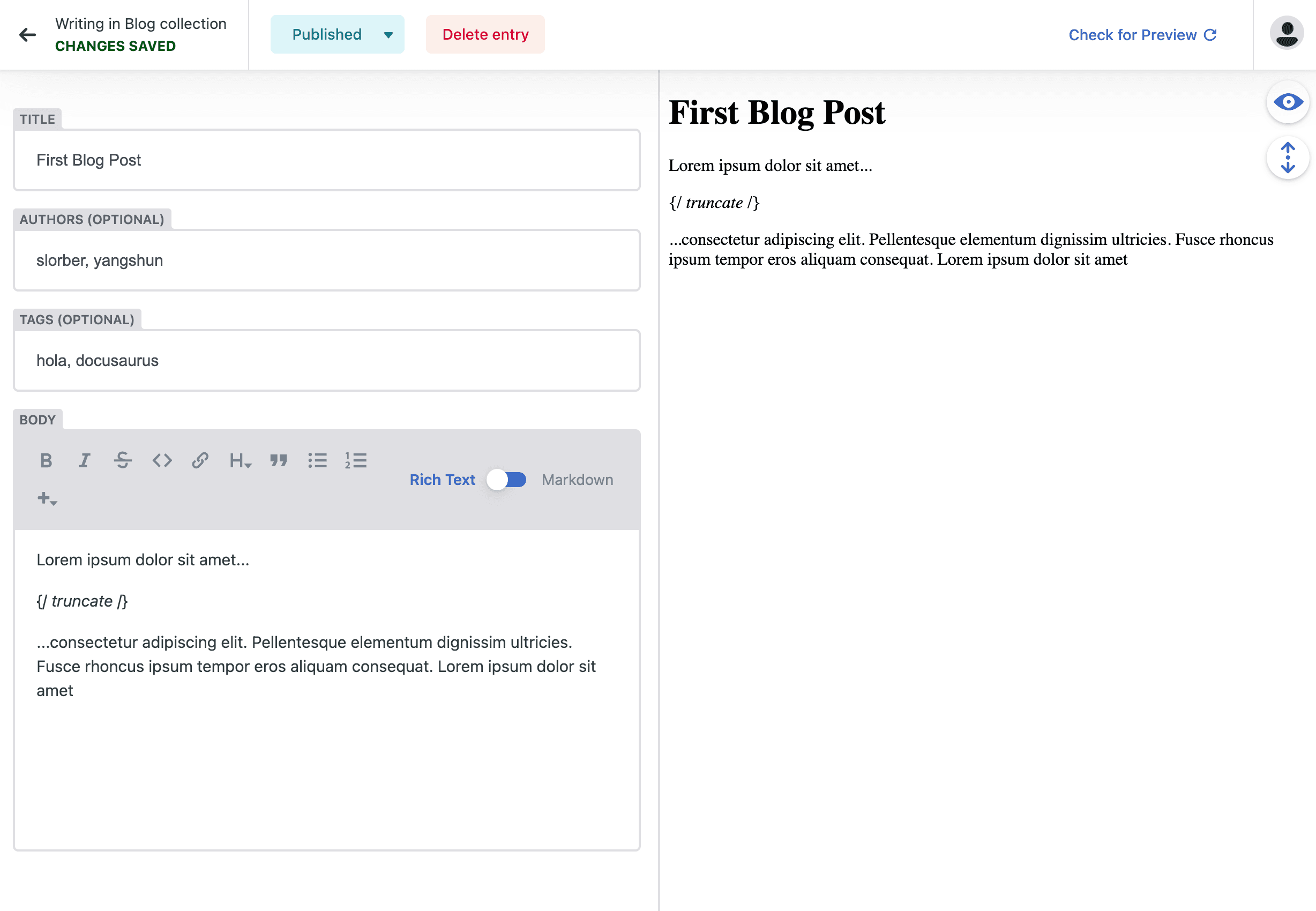
Limitations: The editor is where it falls apart for Docusaurus. Decap's rich-text widget handles plain Markdown only. There's no table support at all (a years-old open issue), no admonitions, and no tabs. You can hand-type :::note blocks in Markdown mode and they'll render on the site, but switching back to rich text mangles them. <Tabs> is effectively unusable, since Decap can't handle JSX or imports. Even Docusaurus's <!-- truncate --> marker shows up as literal text in the preview. Supporting these properly means hand-coding a custom editor widget per component. And in our conflict test, Decap behaved exactly like Tina: it re-fetched the file at publish time and silently overwrote the concurrent commit, with no warning and no merge.
Pricing: The CMS itself is free and open source. Your real costs are hosting, plus the OAuth proxy if you leave Netlify. A hosted offering, Decap Turbo, is in early access: Starter is $29/month (3 users, 1 project), with pricing marked as subject to change before launch. See Decap Turbo →
5. GitCMS
GitCMS is the newest tool here, built by a solo developer, with per-framework support pages covering everything from Astro and Hugo to Docusaurus. Two things set it apart on paper. The pricing: a one-time $49 license per site plus $9 per extra seat — launch pricing, and not a subscription. And a free preview mode that lets you connect a real repo and explore the editor before paying. The preview is strictly read-only, though: saving, publishing, and team workflows stay locked until you buy a license. That also limited our test — the write-path parts of our checklist (commits, PRs, the conflict-overwrite test we ran on Tina and Decap) can't be exercised without paying.
We imported a real Docusaurus project in preview mode. Here's what stood out:
- The base editor is genuinely decent. It's a Notion-like surface, the same family as Dhub's: slash commands for inserting blocks (headings, lists, code blocks, tables), drag handles for reordering, and frontmatter rendered as a form instead of raw YAML.
- But it doesn't speak Docusaurus, and that's the dealbreaker. Admonitions — the most basic Docusaurus construct — show up in the editor as literal
:::noteand:::tiplines with the content floating between them. They don't render as callouts and can't be edited as components. Tabs don't fare any better. GitCMS's docs describe beta support for "custom SSG components", but its stated goal is preserving framework syntax rather than flattening it — preserving raw markup isn't the same as editing it visually. For the writers a CMS is supposed to help, a typical Docusaurus page reads as markup soup. - Media can live outside your repo. The media library supports repository storage or object storage — Cloudflare R2 and AWS S3 — as first-class options. If your images are large or already served from an asset CDN, that's genuinely useful, and none of the other tools here make it this straightforward.
- Inbound sync is automatic. Commits we pushed to GitHub appeared in the GitCMS editor immediately, with no manual pull step. (Dhub, by comparison, has you pull explicitly.)
- Conflicts get a warning, not a merge. When the file changed upstream while we had unsaved edits, GitCMS raised a "Draft found from a different version" banner with Discard and Restore Draft options — and an explicit caution that restoring may overwrite newer changes. That's more protection than Tina or Decap gave us, but it's a draft-recovery flow, not conflict resolution: there's no side-by-side comparison, and restoring means your draft wins wholesale.
Limitations: For Docusaurus, the component gap is disqualifying on its own. Beyond that, GitCMS is GitHub-only (Google sign-in exists, but just for invited editors), cloud-only, not open source, and has no real-time collaboration. And since nothing can be saved without a license, it's the one tool here where trying a real edit-to-commit round trip costs money. (Personal sites and OSS docs can ask about complimentary access.)
Pricing: A site license is $49 one-time per website (launch pricing) with $9 per additional seat. Preview mode is free but read-only. See GitCMS pricing →
What about Spinal?
Spinal is a Git-based CMS for static site generators with a dedicated CMS-for-Docusaurus page, and it ranks high in searches for a Docusaurus CMS. It belongs in this comparison, and we planned to give it the same hands-on treatment as the other four. We couldn't, because as far as we can tell, Spinal is no longer accepting new signups.
Here's what we found when we tried, as of July 17, 2026:
- Every "Start your free trial" button on spinalcms.com — homepage, navigation, and pricing page — links to a signup URL that redirects straight back to the homepage.
- The app's signup page,
app.spinalcms.com/signup, returns a 404. The login page still works, so existing customers appear unaffected. - It's not an outage or a regional block. Archived snapshots show the signup link led to a real registration page until at least May 2025; by December 2025 it had been changed to redirect to the homepage instead.
- Other public activity stopped earlier: the last changelog entry is from November 2023, the last blog post from January 2024, and the last push to the SpinalCMS GitHub org from September 2024.
We found no announcement about any of this, and the site still advertises a free trial and paid plans. We've emailed Spinal's support to ask whether new signups are open and will update this section if we hear back.
Until that changes, there's no way to evaluate Spinal for a new project — the trial can't be started. If Spinal was on your shortlist, the closest matches in this comparison are Dhub and CloudCannon: both are Git-based, keep your content as files in your repo, and are open for signups (we checked).
Frequently asked questions
What is the best CMS for Docusaurus?
For most teams, Dhub. It's the fastest to set up (no config) and the easiest for non-technical writers, with a Notion-like editor and real-time collaboration. Choose Decap CMS if you need free and self-hosted, TinaCMS if you want open source with a stronger editor, or CloudCannon if you want hosting bundled with editing. GitCMS's one-time $49 license is appealing, but its editor doesn't render Docusaurus admonitions or tabs.
Can non-technical writers edit Docusaurus content without using Git?
Yes, that's the main reason to add a CMS. Each tool here gives writers a visual editor and handles the Git operations behind the scenes, so contributors don't need to clone the repo or touch the command line.
Is there a free CMS for Docusaurus?
Decap CMS is fully open source and free to self-host. Dhub has a free Hobby tier for one user on public repositories, and TinaCloud is free for up to two users. CloudCannon has no free tier, only a 21-day trial. GitCMS's free preview mode is read-only — editing requires a one-time $49 site license.
Is Dhub open source or self-hostable?
No, Dhub is a cloud service. Decap and TinaCMS are the open-source, self-hostable options here. Dhub doesn't lock you in, though: your content stays as plain Markdown and MDX files in your GitHub repository, so you can stop using Dhub at any time and keep everything. It's the same ownership model that makes closed-source Obsidian an easy choice for people who care about their files — the app is proprietary, the content is yours.
Is Spinal CMS an option for Docusaurus?
Not at the moment, as far as we can tell. Spinal markets a Docusaurus CMS, but as of July 2026 its signup appears to be disabled: the free-trial buttons on spinalcms.com redirect back to the homepage, and the app's signup page returns a 404. Archived snapshots show signup still worked in May 2025 and was gone by December 2025. Existing customers can still log in. See What about Spinal? above for details.
Do teammates need GitHub accounts to edit through Dhub?
No. Once a project is imported, team members edit and push from Dhub without their own GitHub accounts, and the commit history still records who made each change. That's not a given elsewhere. Decap's standard GitHub backend, for example, has every editor log in with a GitHub account that has write access to the repo.