Navigation
The editor sidebar has two views: Files and Navigation.
Files shows your actual file tree: the markdown, MDX, and media files that make up your content.
Navigation is where you define the structure your readers see: which pages appear, in what order, and how they're grouped.
You can add pages, folders, groups, links, and dividers, then drag and drop to reorder. Everything is visual. No config files to edit by hand.
Edit visually
Organize your docs in the Navigation tab. Add pages, create folders, drag to reorder.navigation.json is generated
Every change is reflected in anavigation.jsonfile in your project root.Push to GitHub
navigation.jsonis committed alongside your content. Your docs framework reads it to render the sidebar.
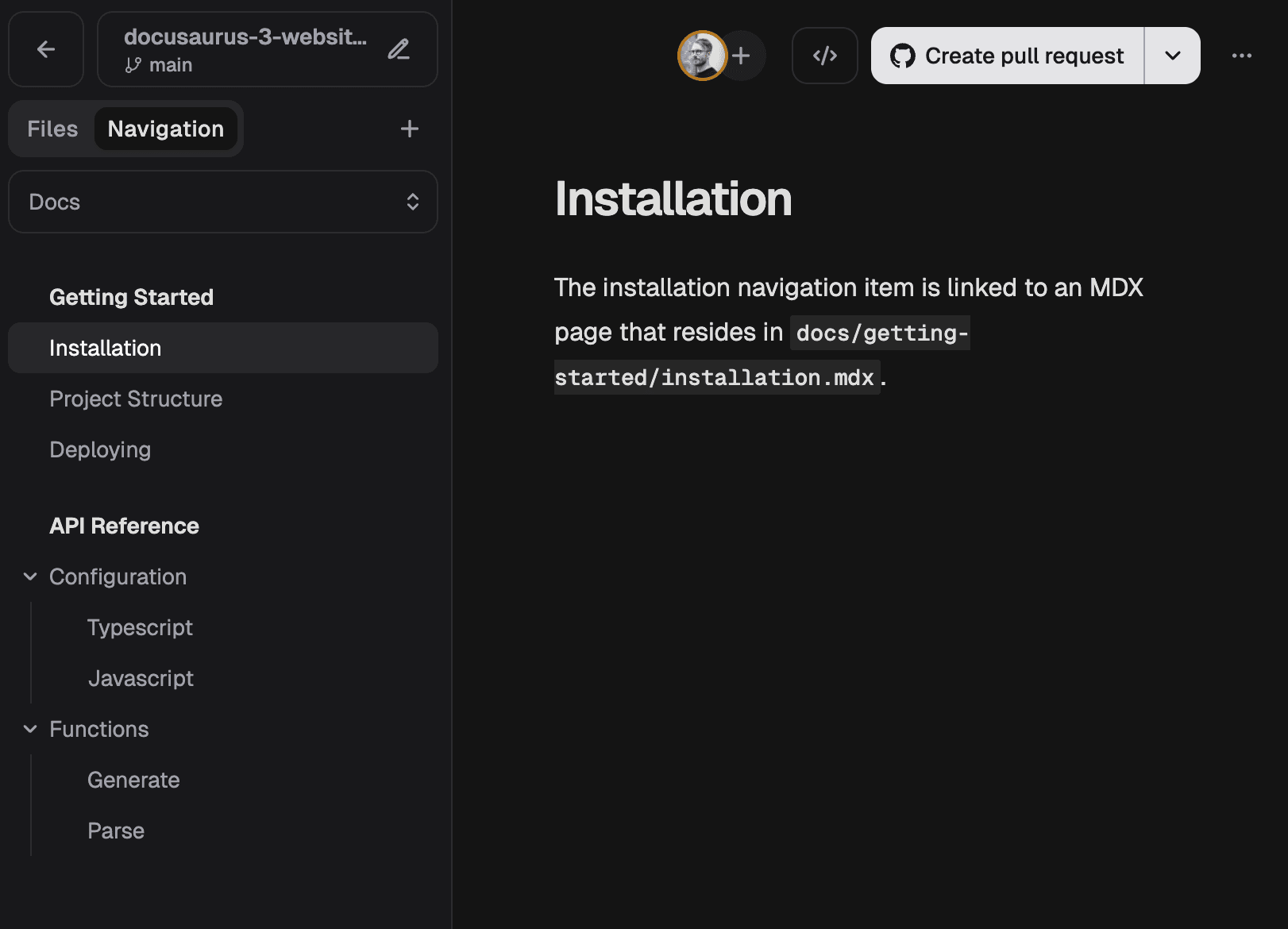
Editing the navigation
New projects start without a navigation. Click Create navigation in the Navigation tab to get started.
The navigation tree supports six node types:
- Tabs: top-level containers. If your docs site has a top navigation bar (e.g. "Guides", "API Reference"), each tab becomes an entry. Most projects only need one, and with a single tab, frameworks typically skip the top nav entirely.
- Pages: references to content files in your project.
- Links: external URLs.
- Folders: collapsible containers that group related pages.
- Groups: non-collapsible containers with a heading.
- Dividers: horizontal rules to break up long lists.
You can add, rename, and delete any of these from the context menu, and drag and drop to reorder or move items between containers.
If you already have a docs site with content, you can generate a navigation.json from your existing sidebar config using Claude Code or a similar tool. Add it to your project root and re-import the project into Dhub.
The navigation.json file
The navigation.json file is the serialized output of everything you build in the Navigation panel. It lives in your project root and is committed to your repository like any other file.
The file is placed in the project root you specified when importing your project. In a monorepo, this is typically a subdirectory, not the repository root.
[
    {
      "label": "Docs",
      "type": "tab",
      "path": "docs",
      "children": [
        {
          "label": "Getting Started",
          "type": "group",
          "children": [
            {
              "label": "Installation",
              "type": "page",
              "path": "docs/getting-started/installation.mdx"
            },
            {
              "label": "Project Structure",
              "type": "page",
              "path": "docs/getting-started/project-structure.mdx"
            },
            {
              "label": "Deploying",
              "type": "page",
              "path": "docs/getting-started/deploying.mdx"
            },
            {
              "label": "Changelog",
              "type": "link",
              "url": "https://mywebsite.com/changelog"
            }
          ]
        },
        {
          "type": "divider"
        },
        {
          "label": "API Reference",
          "type": "group",
          "children": [
            {
              "label": "Configuration",
              "type": "folder",
              "children": [
                {
                  "label": "TypeScript",
                  "type": "page",
                  "path": "docs/api-reference/configuration/typescript.mdx"
                },
                {
                  "label": "JavaScript",
                  "type": "page",
                  "path": "docs/api-reference/configuration/javascript.mdx"
                }
              ]
            },
            {
              "label": "Functions",
              "type": "folder",
              "children": [
                {
                  "label": "Generate",
                  "type": "page",
                  "path": "docs/api-reference/functions/generate.mdx"
                },
                {
                  "label": "Parse",
                  "type": "page",
                  "path": "docs/api-reference/functions/parse.mdx"
                }
              ]
            }
          ]
        }
      ]
    }
  ]
Page
Contains label and path (relative to project root, e.g. docs/getting-started/installation.mdx).
Link
Contains label and url (e.g. https://mywebsite.com/changelog).
Folder
Contains label and children. Rendered as a collapsible section.
Group
Contains label and children. Rendered as a non-collapsible section heading.
Divider
No additional fields. Renders as a horizontal rule.
Docusaurus sidebar integration
Docusaurus uses a sidebars.js (or .ts) config. You can read navigation.json and convert it to the format Docusaurus expects.
Each tab becomes a named sidebar, with the key derived from the tab label (e.g. "API Reference" becomes api-reference). Page paths are stripped of the tab's path prefix since Docusaurus already scopes pages to the content directory.
Here's a sidebars.js that reads navigation.json and builds the Docusaurus sidebar config from it:
const {readFileSync} = require('node:fs');
const {join} = require('node:path');

const sidebars = buildSidebars();

function buildSidebars() {
  const navPath = join(__dirname, 'navigation.json');
  const tabs = JSON.parse(readFileSync(navPath, 'utf-8'));

  const result = {};
  for (const tab of tabs) {
    const sidebarId = slugify(tab.label);
    result[sidebarId] = convertChildren(tab.children || [], tab.path);
  }
  return result;
}

function convertChildren(children, tabPath) {
  return children.map(node => convertNode(node, tabPath)).filter(Boolean);
}

function convertNode(node, tabPath) {
  switch (node.type) {
    case 'page':
      return {
        type: 'doc',
        id: stripPrefix(stripExtension(node.path), tabPath),
        label: node.label,
      };

    case 'link':
      return {
        type: 'link',
        label: node.label,
        href: node.url,
      };

    case 'folder':
      return {
        type: 'category',
        label: node.label,
        items: convertChildren(node.children || [], tabPath),
      };

    case 'group':
      return {
        type: 'category',
        label: node.label,
        collapsible: false,
        collapsed: false,
        items: convertChildren(node.children || [], tabPath),
      };

    case 'divider':
      return {
        type: 'html',
        value: '<hr>',
        className: 'sidebar-divider',
      };

    default:
      return null;
  }
}

function stripExtension(filePath) {
  return filePath.replace(/\.(mdx?|jsx?|tsx?)$/, '');
}

function stripPrefix(filePath, prefix) {
  if (prefix && filePath.startsWith(prefix + '/')) {
    return filePath.slice(prefix.length + 1);
  }
  return filePath;
}

function slugify(label) {
  return label
    .toLowerCase()
    .replace(/[^a-z0-9]+/g, '-')
    .replace(/(^-|-$)/g, '');
}

module.exports = sidebars;
Other frameworks
The same approach works for any framework with a programmatic sidebar config. Read navigation.json, walk the tree, and map each node type to your framework's equivalent.